Download
FORGE ONE 0.18.1 · forge-one-0.18.1.fwsc
610,090 bytes · 25 Oct 2026 · built by GitHub Actions from commit 22b7cd8 (pull request #6, build run). Fixes in 0.18. The device menu still shows 0.18.
SHA-256: 5fea01bb2106023b5d5958c1ce556555f4720f01d8eee21df291ce9fcf10dcd6
Check the file on macOS: shasum -a 256 forge-one-0.18.1.fwsc
Source code: github.com/kkasemsa/FORGE-ONE · License (GPL-3.0)
Previous: FORGE ONE 0.18
Tested on the author's FM1. SHA-256: 77380fef1192936c9bf4509717f6aca309670dd00053c01e8f3e95df5757e855
Older: FORGE ONE 0.17
Tested on the author's FM1. SHA-256: 03830b1141bc2ff9fd065631dcc7df09ff5516ad8dffca4ac52b36c54da31b6d
Older: FORGE ONE 0.16
Tested on the author's FM1. SHA-256: 74d22ea705d5800c39aefcaafc043aae70b1598ccd172bdc267ea6ec7ccca0f8
What's new in 0.18
0.18.1 (bug fixes): the action box no longer leaves text behind on the Song Mode screen after it closes, and a FILL now always ends when you let go of D4 + C4.
K4 steps through songs
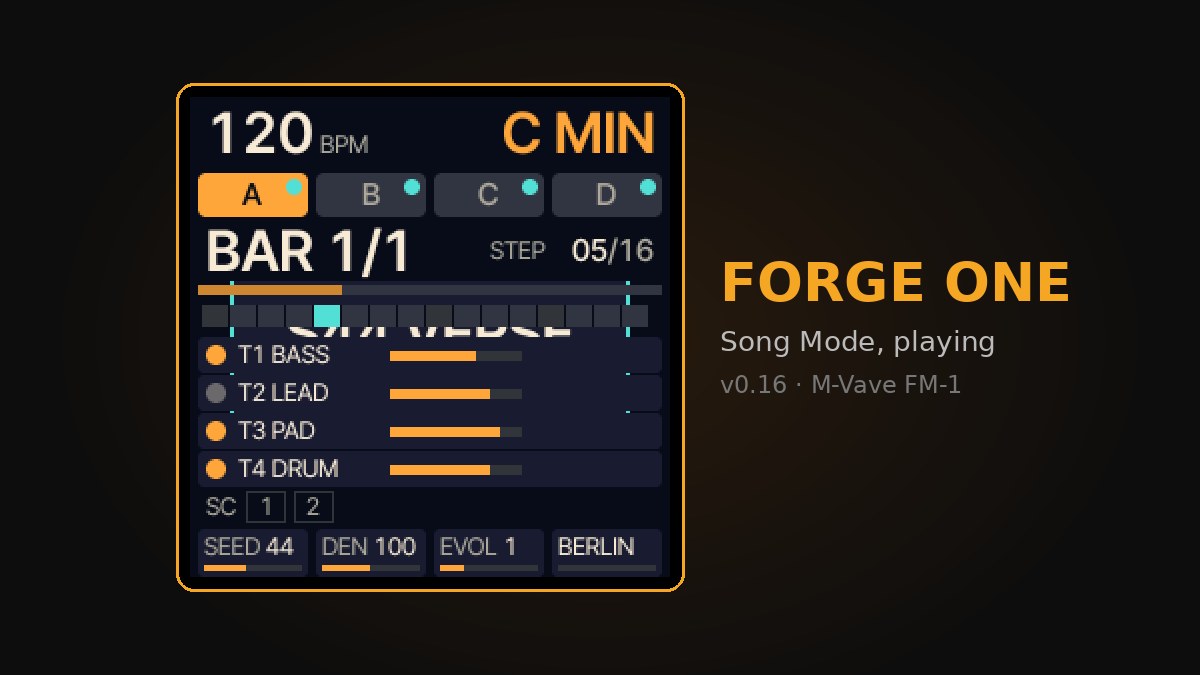
In Song Mode, turn K4 to go to the next starter, through every variation and genre (e.g. TRANCE LIFT 2/3). Sound and tempo follow the song. No trip back to STARTER.
Key LEDs show status
Black keys 1–4: a queued part blinks fast, the next CHAIN part blinks slow. C4 blinks while a FILL waits, stays lit while it plays. F5 lights on every beat with CLICK on.
HELP mode
Hold FX and tap D4. Press any key to see what it does and its D4 / FX combos, without triggering it. Tap FX + D4 again to play.
Key by circle of fifths
Turn ALGORITHM right to go up a fifth (C → G → D), left to go down (C → F → B♭). Still changes at the next bar.
AUTO EVOLVE
FX + F5 toggles it (EVO on screen). Each part-length, one unlocked track changes a little: notes on T1–T3, the beat on T4. Locked tracks never change.
3 new genres
Chiptune, Minimal and Electro: 9 new songs, now 54 songs across 16 genres. Turn K4 to find them, after JARRE.
| Genre | Song | BPM | Scale | Bass · Lead |
|---|---|---|---|---|
| Chiptune | 1 LEVEL | 150 | MAJ | LOFI WAVE BASS · 8BIT LEAD |
| 2 BOSS | 140 | MIN | LOFI WAVE BASS · LOFI PULSE LD | |
| 3 MENU | 120 | MAJ | LOFI WAVE BASS · LOFI ARP 8BIT | |
| Minimal | 1 LOOP | 128 | MIN | DEEP BASS · PHASE RESO |
| 2 HYPNO | 130 | PHRY | ANALOG SUB BASS · BERLIN RESO | |
| 3 CLICK | 124 | DOR | FM6 FM BASS · FM6 BELL | |
| Electro | 1 MIAMI | 128 | MIN | ELECTRO BASS · LOFI PULSE LD |
| 2 ROBOT | 122 | PHRY | ELECTRO BASS · VOICE VOX LEAD | |
| 3 FREAK | 126 | MIN | OCTAVE BASS · TRIO SYNC LEAD |
What is it?
FORGE ONE is built on Felucca 1.6.1 by Leo Kuroshita (Hügelton Instruments). Everything in Felucca works as before; FORGE ONE adds a seeded generator, song starters and a live Song Mode. Projects you make stay compatible with stock Felucca 1.6 / 1.6.1.
Features
4 tracks, generated
Bass, lead, pad (chords) and drums written on the box from one seed, with a sound loaded on each track.
16 genres, 54 starters
Detroit, Berlin, Dub Techno, Acid, Trance, Deep House, Synthwave, Ambient, Lo-Fi, Jarre, Chiptune, Minimal, Electro and more, each with its own sounds, tempo and swing.
Key, scale & tempo
Change key and scale (MIN DOR PHRY MPEN HARM MAJ LYD MIX PEN) at the next bar; set or tap the tempo.
SEED · DENSITY · EVOLVE
New ideas from the seed, busier or sparser parts, and patterns that develop over the loops.
Song Mode, parts A–D
Verse, chorus, bridge and lift/break from one seed. Queue parts at the next bar or let CHAIN run A→B→C→D.
Mute on the fly
Hold FX and press a track key. Momentary, or latched with MENU > FX LATCH.
Reroll & lock
New notes for one track or every unlocked track. Lock the tracks you love.
Focus + knobs
Put one track on the four knobs: cutoff, resonance, envelope, decay and more.
Presets on the next bar
Browse the focused track's presets; the change lands on the bar. OCT− cancels, OCT− twice undoes.
Favourites & mixer
Four favourite sounds one press away. Hold D4 and turn the knobs for T1–T4 levels.
Live tools
Hold-to-play repeat, filters, tape stop and throws; two knob scenes; tap tempo; a visual click.
Everything on screen
Every key and knob shows what it did in a big box for about a second.
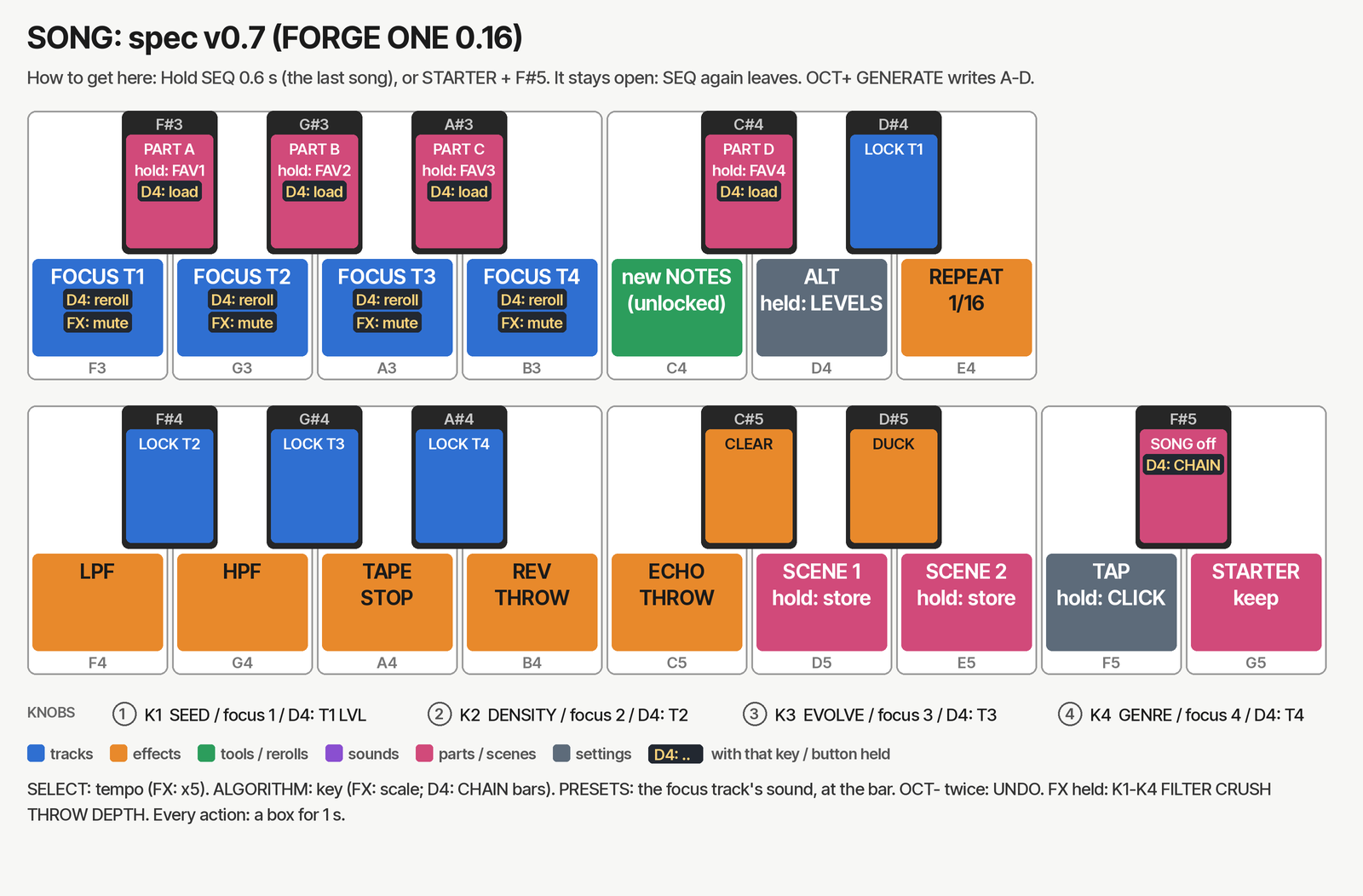
Song Mode cheat-sheet
Hold SEQ for 0.6 s to open Song Mode. Press SEQ again to leave.
| Do this | Press |
|---|---|
| Play part A–D (at next bar) | Black keys 1–4 F#3G#3A#3C#4 |
| Mute T1–T4 (while held) | FX + F3G3A3B3 |
| Clear all mutes and effects | C#5 |
| Reroll one track | D4 + F3–B3 |
| Reroll every unlocked track | C4 |
| Lock T1–T4 | Black keys 5–8 D#4F#4G#4A#4 |
| Focus a track on the knobs | F3–B3 (same key again: off) |
| Change the focused track's preset | Turn PRESETS (lands at next bar) |
| Cancel a waiting change | OCT− |
| Undo last reroll / preset / favourite / key | OCT− twice quickly |
| Load favourite 1–4 | D4 + black 1–4 |
| Store favourite 1–4 | Hold black 1–4 for 0.5 s |
| Mixer (T1–T4 levels) | Hold D4, turn K1–K4 |
| CHAIN on/off · bars per part | D4 + F#5 · D4 + ALGORITHM |
| Tempo ±1 (FX: ±5) · tap tempo | SELECT · F5 |
| Key up / down a fifth · scale | ALGORITHM · FX + ALGORITHM |
| Knobs (no focus) | K1 SEED · K2 DENSITY · K3 EVOLVE · K4 every starter |
| HELP on/off (keys say what they do) | FX + D4 |
| AUTO EVOLVE on/off | FX + F5 |
| FX macros | Hold FX: FILTER · CRUSH · THROW · DEPTH |
Install (macOS)
The official Felucca web installer only installs stock Felucca, so FORGE ONE uses Felucca's command-line installer. Steps from the project README.
- Back up with the Felucca web editor (keep your FM6
.syxfile too; the backup leaves it out). - Quit Ableton Live and every other MIDI app. Connect the FM1 with a USB data cable and turn it on.
- Once, in Terminal:
python3 -m venv ~/fm1-env
~/fm1-env/bin/pip install mido python-rtmidi
- Download
fm1_install.pyinto the folder with the.fwscfile. - Run it there:
~/fm1-env/bin/python fm1_install.py forge-one-0.18.1.fwsc
It asks before writing. Don't unplug or let the Mac sleep until it says done. The FM1 restarts on its own. - Check: the start-up screen says FORGE ONE, and holding SEQ shows FORGE on F5 and STARTER on G5.
Windows / Linux steps are not documented yet.
Go back to stock
- Stock Felucca: the official web installer in Chrome or Edge.
- M-Vave's own firmware: the web installer's Return to official V15, or M-Vave's updater.
If the FM1 does not start
- Install stopped part-way: run the same install command again; it finishes the write.
- Black screen: check if your Mac sees a USB device named WL80UBOOT (the chip's boot mode). Try another data cable, quit MIDI apps, and run the official web installer again.
- Still stuck: FM-1 Transporter can write the flash through a Seeed XIAO RP2040 wired to the FM1's USB lines. Back up the flash first.
Changelog
- 0.18.1 · 25 Oct 2026 · Fixes: text left on the Song Mode screen after the action box closed while playing; a held FILL (D4 + C4) could get stuck.
- 0.18 · 25 Oct 2026 · K4 in Song Mode steps through every starter (e.g.
TRANCE LIFT 2/3). ALGORITHM now moves the key by fifths. HELP mode (FX + D4): each key shows what it does. AUTO EVOLVE (FX + F5) changes one unlocked track a little every few bars. New LED hints for the waiting part, CHAIN, FILL and the click. Three new genres: Chiptune, Minimal, Electro (54 starters in 16 genres). - 0.17 · 24 Oct 2026 · G5 leaves SONG to the play screen in one press, FILL on D4 + C4 (snare roll, tom run, kick build, crash), PRESETS browse by category, sounds kept when you leave and return, bar lines drawn once.
- 0.16 · 24 Oct 2026 · Hold SEQ to open Song Mode, every action on screen, UNDO (OCT− twice), visual CLICK, auto CHAIN of parts.
- 0.15 · 24 Oct 2026 · One-touch Song Mode with its own screen; D4 mixer.
- 0.14 · Classic drum kits 90, MP, SD; 808 and 909 kits.
- 0.13 · Song Mode: four parts A–D and the arrangement from one seed.
- 0.6 – 0.9 · STARTER, 45 song starters in 13 genres, the FORGE PACK sounds, PERFORM.
Feedback
Found a bug or have an idea? Email [email protected]
FORGE ONE is free. If it helped your jams, you can buy me a coffee ($3).
Support FORGE ONE ☕