Download
FORGE ONE 0.16 · forge-one-0.16.fwsc
610,090 bytes · 24 Oct 2026 · built by GitHub Actions from commit 4041239 (branch song-v07, build run). Installed and tested on the author's FM1.
SHA-256: 74d22ea705d5800c39aefcaafc043aae70b1598ccd172bdc267ea6ec7ccca0f8
Check the file on macOS: shasum -a 256 forge-one-0.16.fwsc
Source code: github.com/kkasemsa/FORGE-ONE · License (GPL-3.0)
What is it?
FORGE ONE is built on Felucca 1.6.1 by Leo Kuroshita (Hügelton Instruments), the open-source FM1 firmware. Everything in Felucca works as before; FORGE ONE adds a seeded generator, song starters and a live Song Mode. Projects you make stay compatible with stock Felucca 1.6 / 1.6.1.
Features in 0.16
4 tracks, generated
Bass, lead, pad (chords) and drums written on the box from one seed, with a sound loaded on each track.
13 genres, 45 starters
Detroit, Berlin, Dub Techno, Acid, Trance, Deep House, Synthwave, Ambient, Lo-Fi, Jarre and more, each with its own sounds, tempo and swing.
Key, scale & tempo
Change key and scale (MIN DOR PHRY MPEN HARM MAJ LYD MIX PEN) at the next bar; set or tap the tempo.
SEED · DENSITY · EVOLVE
New ideas from the seed, busier or sparser parts, and patterns that develop over the loops.
Song Mode, parts A–D
Verse, chorus, bridge and lift/break from one seed. Queue parts at the next bar or let CHAIN run A→B→C→D.
Mute on the fly
Hold FX and press a track key. Momentary, or latched with MENU > FX LATCH.
Reroll & lock
New notes for one track or every unlocked track. Lock the tracks you love.
Focus + knobs
Put one track on the four knobs: cutoff, resonance, envelope, decay and more.
Presets on the next bar
Browse the focused track's presets; the change lands on the bar. OCT− cancels, OCT− twice undoes.
Favourites & mixer
Four favourite sounds one press away. Hold D4 and turn the knobs for T1–T4 levels.
Live tools
Hold-to-play repeat, filters, tape stop and throws; two knob scenes; tap tempo; a visual click.
Everything on screen
Every key and knob shows what it did in a big box for about a second.
Song Mode cheat-sheet
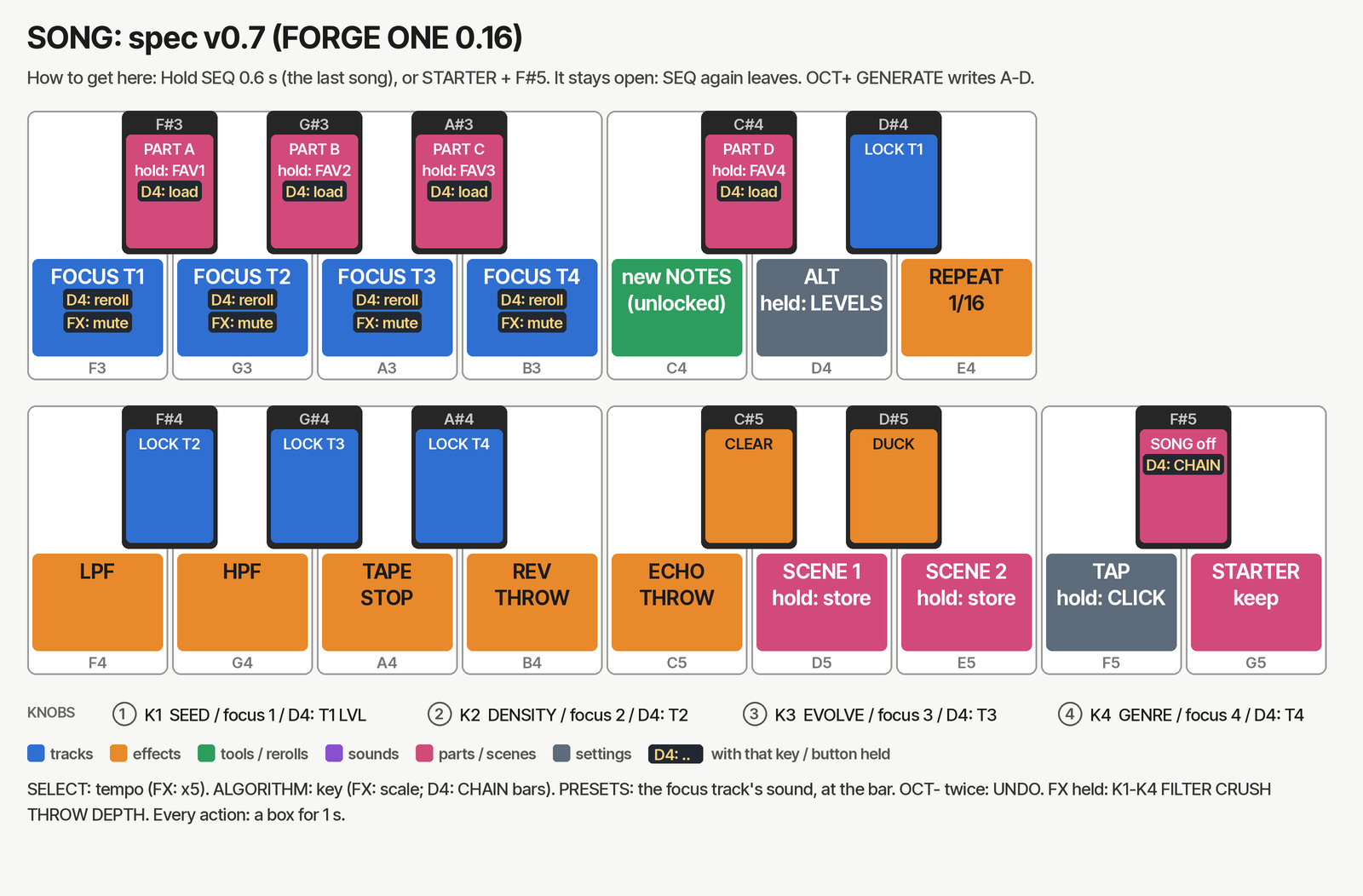
Hold SEQ for 0.6 s to open Song Mode. Press SEQ again to leave.
| Do this | Press |
|---|---|
| Play part A–D (at next bar) | Black keys 1–4 F#3G#3A#3C#4 |
| Mute T1–T4 (while held) | FX + F3G3A3B3 |
| Clear all mutes and effects | C#5 |
| Reroll one track | D4 + F3–B3 |
| Reroll every unlocked track | C4 |
| Lock T1–T4 | Black keys 5–8 D#4F#4G#4A#4 |
| Focus a track on the knobs | F3–B3 (same key again: off) |
| Change the focused track's preset | Turn PRESETS (lands at next bar) |
| Cancel a waiting change | OCT− |
| Undo last reroll / preset / favourite / key | OCT− twice quickly |
| Load favourite 1–4 | D4 + black 1–4 |
| Store favourite 1–4 | Hold black 1–4 for 0.5 s |
| Mixer (T1–T4 levels) | Hold D4, turn K1–K4 |
| CHAIN on/off · bars per part | D4 + F#5 · D4 + ALGORITHM |
| Tempo ±1 (FX: ±5) · tap tempo | SELECT · F5 |
| Key ±1 semitone · scale | ALGORITHM · FX + ALGORITHM |
| Knobs (no focus) | K1 SEED · K2 DENSITY · K3 EVOLVE · K4 GENRE |
| FX macros | Hold FX: FILTER · CRUSH · THROW · DEPTH |
Install (macOS)
The official Felucca web installer only installs stock Felucca, so FORGE ONE uses Felucca's command-line installer. Steps from the project README.
- Back up with the Felucca web editor (keep your FM6
.syxfile too; the backup leaves it out). - Quit Ableton Live and every other MIDI app. Connect the FM1 with a USB data cable and turn it on.
- Once, in Terminal:
python3 -m venv ~/fm1-env
~/fm1-env/bin/pip install mido python-rtmidi
- Download
fm1_install.pyinto the folder with the.fwscfile. - Run it there:
~/fm1-env/bin/python fm1_install.py forge-one-0.16.fwsc
It asks before writing. Don't unplug or let the Mac sleep until it says done. The FM1 restarts on its own. - Check: the start-up screen says FORGE ONE, and holding SEQ shows FORGE on F5 and STARTER on G5.
Windows / Linux steps are not documented yet.
Go back to stock
- Stock Felucca: the official web installer in Chrome or Edge.
- M-Vave's own firmware: the web installer's Return to official V15, or M-Vave's updater.
If the FM1 does not start
- Install stopped part-way: run the same install command again; it finishes the write.
- Black screen: check if your Mac sees a USB device named WL80UBOOT (the chip's boot mode). Try another data cable, quit MIDI apps, and run the official web installer again.
- Still stuck: FM-1 Transporter can write the flash through a Seeed XIAO RP2040 wired to the FM1's USB lines. Back up the flash first.
Changelog
- 0.16 · 24 Oct 2026 · Hold SEQ to open Song Mode, every action on screen, UNDO (OCT− twice), visual CLICK, auto CHAIN of parts.
- 0.15 · 24 Oct 2026 · One-touch Song Mode with its own screen; D4 mixer.
- 0.14 · Classic drum kits 90, MP, SD; 808 and 909 kits.
- 0.13 · Song Mode: four parts A–D and the arrangement from one seed.
- 0.6 – 0.9 · STARTER, 45 song starters in 13 genres, the FORGE PACK sounds, PERFORM.
Feedback
Found a bug or have an idea? Email [email protected]