Getting Started
Your first jam on FORGE ONE 0.16, step by step.
Written from the FORGE ONE 0.16 user guide. Steps marked ⚑ check on your unit are not confirmed in the 0.16 docs.
1. First power-on
- After installing, the start-up screen shows FORGE ONE and its logo (a flame on an anvil).
- You then land on the normal Felucca screens: everything Felucca 1.6.1 does still works.
- Quick check: hold SEQ and look at the SEQ TOOLS map: FORGE is on F5, STARTER on G5.
2. Open Song Mode
Hold SEQ for 0.6 seconds (stopped or playing). Song Mode opens straight away with your last song. It stays open on its own, so you can let go of SEQ. To leave, press SEQ again (or HOME, or a page button).
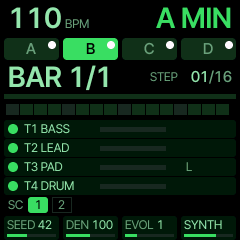
What the screen shows
- Top: tempo and key, and the parts A–D (the playing one filled).
BAR 3/8andSTEP 09/16, and 16 cells with the playhead.- Four track rows: a dot that lights on each note, a level meter,
M= muted,L= locked,FOCUS. - Bottom: the four knob cards as they are now.
- Every key or knob opens a box in the middle for about a second. A red frame means it was refused (e.g.
T3 LOCKED).
Tip: MENU > SYSTEM > BOOT SONG opens Song Mode at power-on.
3. Pick a genre, key and tempo
- Genre: turn K4 GENRE. 13 genres: Berlin, Detroit, Dub Techno, Melodic, Acid House, Acid Techno, Trance, Deep House, Synthwave, Breakbeat, Ambient, Lo-Fi, Jarre. Each loads its own four sounds, tempo, scale and swing. In Song Mode K4 always gives the genre's first variation; to pick other variations (3–4 per genre) use STARTER (SEQ + G5, then black keys 1–4).
- Tempo: SELECT ±1 BPM (with FX ±5), or tap it on F5.
- Key: ALGORITHM moves it a semitone. Scale: FX + ALGORITHM. While playing, both change at the next bar and all four tracks are rewritten in the new key.
4. Shape it: SEED, DENSITY, EVOLVE
| Knob | What it does |
|---|---|
| K1 SEED | A new song idea in the same genre. |
| K2 DENSITY | All four parts busier or sparser (50–150 %). |
| K3 EVOLVE | How much the patterns develop as they loop. |
| K4 GENRE | Change genre. |
5. Your first jam
Press PLAY, then try these in order.
 black:  F#3 G#3 A#3 C#4 | D#4 F#4 G#4 A#4 | C#5 ... F#5
         [A] [B] [C] [D] | [L1][L2][L3][L4] |CLEAR   SONG
 white:  F3  G3  A3  B3  | C4        D4
         [T1][T2][T3][T4]| REROLL ALL  ALT (mixer/reroll/fav)
① Mute a track
Hold FX and press F3 (T1 bass), G3 (T2 lead), A3 (T3 pad) or B3 (T4 drums). It's muted while held. For tap-on/tap-off, set MENU > FX LATCH ON. C#5 clears every mute and effect.
② Reroll
D4 + F3–B3 gives one track new notes (T4: a new drum rhythm). C4 rerolls every unlocked track.
③ Lock
Black keys 5–8 (D#4 F#4 G#4 A#4) lock T1–T4. A locked track ignores rerolls (T3 LOCKED), so keep the bassline you love and reroll the rest.
④ Focus and tweak
Tap F3–B3 to put that track on the knobs (tap again: off).
| Track | K1 | K2 | K3 | K4 |
|---|---|---|---|---|
| T1 BASS | CUTOFF | RESO | ENV MOD | DECAY |
| T2 LEAD / T3 PAD | FILTER | A/R | SEND | LEVEL |
| T4 DRUM | KICK | TUNE | DECAY | DRIVE |
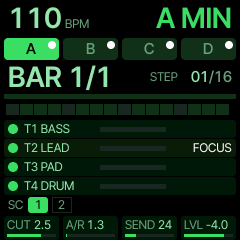
⑤ Change preset on the next bar
With a track focused, turn PRESETS. The new sound loads at the next bar (at least 0.6 s after your last turn). OCT− before then cancels.
⑥ Undo
Press OCT− twice quickly. It takes back the last reroll, preset, favourite or key/scale change (one level).
⑦ Favourites
Focus a track, then D4 + FX + black 1–4 stores its sound in FAV 1–4 (holding black 1–4 for 0.5 s also stores). D4 + black 1–4 loads it at the next bar. Drum kits only go on T4.
⑧ Mixer
Hold D4 and turn K1–K4 for T1–T4 levels (MIXER shows at the top). Let go: the levels stay.
⑨ Switch parts A–D
Black keys 1–4 (F#3 G#3 A#3 C#4) jump to A VERSE, B CHORUS, C BRIDGE, D LIFT/BREAK at the next bar. D4 + F#5 turns on CHAIN (A→B→C→D→A…); D4 + ALGORITHM sets the bars per part (1/2/4/8/16).
Bonus
Hold E4–C5 for repeat, LPF, HPF, tape stop, reverb and echo throws. Hold FX and turn the knobs for FILTER/CRUSH/THROW/DEPTH (snap back on release).
6. Saving
- Your song settings (seed, genre, key, tempo, part, locks, rerolls) are remembered automatically when you leave Song Mode, and come back next time you hold SEQ.
- To write the four parts to project slots A–D: OCT+ asks
OVERWRITE A-D?, then OCT+ again writes them and the arrangement. Stop playback first (STOP TO SAVE). After writing, a reroll asksSAVE B?for that part. ⚑ check on your unit: this flow is documented for 0.13; the 0.16 key table does not list OCT+. - Keep a sound you made: SAVE > USER while the track has it.
- Mutes and scenes are never saved.
FORGE ONE is free. If it helped your jams, you can buy me a coffee ($3).
Support FORGE ONE ☕